
In my previous article, I demonstrated how I managed to attack a Docker container due to a publicly accessible PHP-FPM socket on a TCP port. However, in traditional (non-containerized) infrastructure, Unix sockets are more commonly used. These sockets behave similarly to regular files with various permissions. The permissions of these Unix sockets are absolutely critical, and their misconfiguration has been the downfall of many services.
How It Works
The PHP-FPM master process launches subprocesses (FPM pools) under specific users and makes each pool accessible via a socket. The web server then needs to communicate with this socket. The key configuration parameters to consider are:
- user
- group
- listen.owner
- listen.group
- listen.mode

Of course, there is still room for improvement – for example, it is possible to run multiple PHP-FPM master processes – every under a separate user. This also achieves isolation at the RAM level with low overhead.
In reality, the user (website owner) doesn’t need any access to the socket at all. Only the web server needs access to connect to the process running under a specific user.
If the permissions are set incorrectly, we encounter the same situation as in the previous article, where any user can impersonate another.
The Beginning of My Research
This issue actually sparked my entire research when the Xcloud.host service, which collaborates with WP Manage Ninja, was launched. Out of curiosity, I registered for a trial version and immediately discovered this vulnerability. I became interested in how common this problem is in today’s hosting landscape. The results, as you might imagine, were quite surprising.
The very first thing I always try on new hosting is my MiniFileBrowser, which gives me a quick overview of where I can get to from the current site.
TCP Sockets in Traditional Infrastructure
Even in traditional infrastructure, it’s possible to set up access to the socket via TCP (on a local network within the machine). If you do this, you’ve just created a catastrophic vulnerability. Unlike in containerized networks, you have no way to restrict who accesses the socket because all traffic comes from localhost (127.0.0.1). Unfortunately, I’ve encountered this setup as well…
What caused the vulnerability?
The core of this vulnerability lies in misconfigured permissions on PHP-FPM sockets. Many hosting providers failed to properly restrict access to these sockets, inadvertently allowing unauthorized users to interact with them.
The issue is caused by the fact that PHP-FPM, when communicating with the web server via FastCGI, allows for modification of PHP configuration through PHP_VALUE parameters. This means that if an attacker gains access to the PHP-FPM socket, they can potentially execute arbitrary PHP code or modify PHP settings, leading to severe security breaches.
You can use the same exploit as in the previous article, just replace the connection to the TCP socket with a connection to the Unix socket. Here we don’t have to be bound to php://input, but we can use an existing file as payload, for example in /tmp, which can bypass other security mechanisms.
What are the impacts?
The impacts of this vulnerability are both severe and far-reaching. In a shared hosting environment, compromising one site could potentially lead to control over all others on the server – cross-site contamination. This is particularly dangerous in scenarios where a developer manages multiple client sites on the same server. Moreover, an attacker could potentially execute code with the privileges of the PHP-FPM process, which might have higher permissions than a typical web user. This could lead to configuration manipulation, data breaches affecting all websites on the server, and even malware propagation across multiple sites. The ability to modify PHP configurations could disable crucial security features or enable dangerous functions, further compromising the entire server’s security.
How to fix it?
It’s crucial to ensure that PHP-FPM sockets have the correct file permissions, allowing only the web server user to have read and write access. For added security, websites should be isolated better using dedicated master FPM processes or containerization to prevent cross-site contamination.
Affected Providers
I detected problems with local PHP-FPM sockets in the following providers:
- Xcloud.host (Unix sockets)
- Cloudways (Unix sockets)
- Gridpane (both Unix and TCP sockets)
- Ploi (Unix sockets)
- Cloudpanel.io (TCP sockets)
- Forge (Unix sockets)
In the following sections, we’ll dive deeper into each of these cases, exploring the vulnerabilities, their impacts, and the process of reporting and resolving them.
Addressing the Issue with Providers
Xcloud.host
My research actually began with this provider. As I use several WPmanageNinja products, I was very interested in what their “NextGen” hosting management tool would be like.
The day after launch, I created a trial account and discovered that, from my perspective, it wasn’t very “next-gen” as it used a traditional infrastructure. After a brief investigation, I uncovered several security flaws and tried to report them (on February 2nd). Initially, this was very difficult because there were no appropriate contacts for reporting security issues, and attempts through support tickets and Facebook messages yielded no response.
Eventually, I connected with Jewel from WPManageNinja via Slack and finally got the right contact to Nobin after several days. The user permissions issue was resolved fairly quickly, but upon subsequent checks, the default socket for the www-data user was still accessible and had sufficient permissions to carry out an attack. This was also eventually fixed.
Cloudways
After discovering the problems with Xcloud.host, I was curious if other providers of similar services had this issue. I tried Cloudways, which seemed to be the most heavily promoted. Unfortunately, I found that they also had the same problem with FPM socket permissions. While I could somewhat rationalize finding this issue in a newly launched startup like Xcloud, I couldn’t imagine it existing in a service that had been on the market for so long…

Reporting the problem was one of the biggest nightmares I’ve ever experienced and demonstrates a critical failure of processes…
I’ll try to briefly summarize more than 3 months of my life:
Again, I couldn’t find any suitable contact for reporting security issues, so I tried to report the problem through support several times, starting on March 7th. I always got general information that they had passed it on to the security team, but nothing happened. I tried to escalate the issue through account managers, from whom I received various requests for feedback. I gave up this route on March 25th.
On March 28th, I tried a different approach – directly through the security contact of the parent company, Digital Ocean. I received a response here and reported the problem along with a Proof of Concept (PoC). In further communication, I sent the report again in a different format at their request and added a report of another vulnerability, to which I never received any response. Despite assurances that the report was verified and forwarded to the correct teams, nothing continued to happen.
On May 2nd, I announced my intention for public disclosure, to which I received no negative response. However, I tried another route before did it – through Patchstack, where I obtained a contact for the Cloudways security team from Oliver. So I reported the problem again there.
The problem was verified, but I was asked to send it again through the Intigriti bug bounty platform, which was supposed to go live “early next week”. “Early next week” turned out to be another 2 weeks of ignored communication where I was inquiring about the status.
On May 17th, I reported the problem (already verified at least twice) through Intigriti, went through another lengthy explanation of the problem, until the issue was finally verified on May 21st. According to the program information, it was supposed to be resolved within 5 working days. As of June 24th, I still don’t see a single sign of an attempt to solve the problem, apart from lowering the severity without any comment on the issue, banning my personal account on Cloudways, and a reminder of the bug bounty program rules…

As you can see, responsible disclosure is sometimes really painful….
GridPane
Here too, I had trouble finding a contact to report the problem. Some trolling on social media worked here, when Jeff contacted me within 2 working days and a fix was prepared the following day. I must admit that the communication was at a very high technical level.
Here I found problems with both Unix FPM socket permissions and a running TCP socket for phpMyAdmin, which could thus be modified using it.
I very much enjoyed the technical discussion with Jeff over the issues, it’s a pleasure to come across someone who has a similar passion for the cause.
Ploi
It took about a month here before the priority came to solve this problem. Dennis from Ploi set aside several days solely for this issue, during which I actively communicated with him and helped him fine-tune the settings.
I would note that I don’t particularly like the fact that by default, new websites are created under a shared user in this tool, and creation under a dedicated user is hidden in an advanced menu.
I’m glad that a fix was prepared before the publication of this article.
Cloudpanel.io
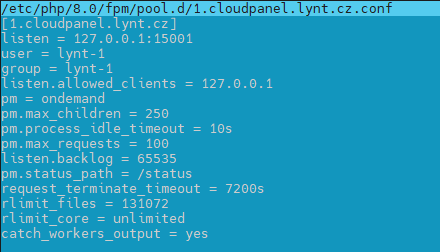
TCP sockets are used here, so it’s impossible to control permissions. According to the developers, this is a major change, and the fix is planned for version 3, which is set to be released in the future. We discussed this issue through this tool’s Discord channel.
Forge
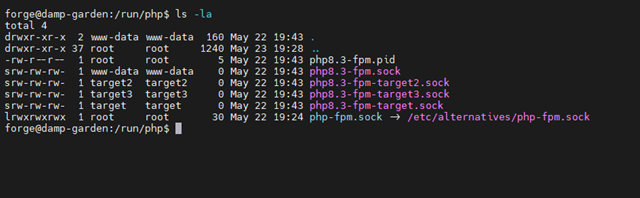
Here again, I found a collection of PHP-FPM sockets with incorrect permissions – not only sockets of individual users but also the general socket of the www-data user. I reported the problem through support tickets, but unfortunately, I didn’t receive understanding and only got a general recommendation to reduce permissions to 664 myself. Support didn’t address the case further even when I described that it wasn’t the best solution – all users are in the www-data group and would still have access to the main socket. At the same time, a situation where a user has read access to their PHP-FPM socket can cause them to bypass various security measures…
Conclusion
This research has revealed widespread vulnerabilities in PHP-FPM socket configurations across multiple hosting providers. The issues range from misconfigured permissions to the use of TCP sockets without proper access controls. It’s crucial to repeat that users have no legitimate reason to have write access to their PHP-FPM sockets. This unnecessary access can lead to significant security risks, which I will explore in more detail in a future article.
Key takeaways from this investigation include:
- Proper Socket Configuration: It’s essential for hosting providers to correctly configure PHP-FPM sockets, ensuring that only the web server has the necessary access, while restricting user access.
- Security Reporting Processes: The research highlighted significant deficiencies in the security vulnerability reporting processes of many providers. There’s a clear need for improvement in this area.
- Clear Security Contacts: Providers should clearly display their security contact information. Implementing a security.txt file, which I always look for when reporting issues, is an excellent way to achieve this.
- Efficient Support Processes: Support teams should have clear procedures for escalating security-related reports to the appropriate personnel. Many failures were observed in this regard during the research.
The process of reporting and resolving these issues has been challenging, highlighting the need for better security practices and more responsive disclosure processes in the hosting industry. It’s my hope that by sharing these findings, we can contribute to improving security standards across the web hosting landscape.





 Vladimir Smitka
Leave a reply to smitka Cancel reply