This article originally appeared on our company blog Lynt.cz in Czech and English versions.
You’ve probably heard that hiding the WP version is a very important part of WordPress security. At the beginning of February 2017 there was a serious vulnerability issue with the WP REST API where the version shows whether your site is vulnerable or not. So many users were looking for ways to hide information about their WP version.
In my opinion, this is not an important part of the protection process. The makers of WordPress don’t see it as an issue and they’re not trying to hide it. I will present my arguments later in this article, but first let’s look at the methods used to determine the WP version and how to prevent them (if you wish).
readme.html
- The simplest way to determine the version is to visit the URL /readme.html and read the large heading.
- From 4.7 this method is less useful, because WP no longer shows the minor version (4.7.2.), but only the major version(4.7).
Meta generator
- If you open the source code of your site, you will find the meta tag generator with the WP version in it:
- <meta name=”generator” content=”WordPress 4.7.2“>
- You need to find the right line, but it’s still pretty easy.
RSS feed
- Another location to check the version is /feed/, where you can find the XML element generator:
- https://wordpress.org/?v=4.7.2
These 3 methods are the most common ways to determine the WordPress version.
There are ways to prevent these methods. You can block access to readme.html e.g. In the .htaccess file:
        order allow,deny
        deny from all
The message “403 – access denied” will be returned. But it shows the attacker that the file exists. So, pretending the file doesn’t exist may be a better way. You can return the message “404 – not found” with the following rule:
RewriteRule ^readme.html - [L,R=404]
If you want to remove the version from the meta tags and the feed, you need to do it in WP. The version number has it’s origin in the wp-includes/version.php file. It is stored in the global variable called wp_version. One approach is to remove the string with the version so that the site “pre-renders” (ob_start,..) and finds and replaces all occurrences of the version number. I find this to be useless and performance wasting, because it doesn’t work for /feed/. Of course, you can edit the feed, but there are more locations you must edit. Did you know about the file /wp-links-opml.php? It also reveals the version number. It’s a lot of work to validate all these files.
A better approach is to use the WP hook the_generator:
add_filter('the_generator', '__return_empty_string');
It removes the version from meta tags and form the XML feeds.
Usually, there is another location with the version string – in paths to the css and js files. Many plugin/theme creators append the “ver” parameter to the path to prevent client side caching after the update.
/wp-includes/js/wp-embed.min.js?ver=4.7.2
Again, there is a hook to remove it:
function lynt_remove_ver( $src ) {
   $src = remove_query_arg('ver', $src);
   return $src;
}

add_filter( 'script_loader_src', 'lynt_remove_ver' );
add_filter( 'style_loader_src', 'lynt_remove_ver' );
This snippet removes the ver parameter from all js and css files. You can enhance it to remove only ver if it contains the $wp_version value.
These few lines of code are what many plugins that promise to hide the WP version actually do, nothing more.
You may be tempted to change the version number directly in version.php. This is not a very good idea, as you will end up preventing future updates and violating the file consistency of your WP installation. Tools that do file consistency checks wouldn’t like it.
Besides these simple methods there many other ways to determine WP version. One is called Advanced Fingerprinting which it checks hashes of some static files from WP core.
For example, I can download the file /wp-admin/js/customize-controls.js and calculate md5 hash from it’s contents. If it is d89eff32867dbead906999d2d33df9dc, the version is 4.7 because there is no other version with that exact content of this file. If the result is c48eef3773572618f27809300fae0cde, the version is 4.3. In 3.9 this file has a hash 119ce8b94732f6eb170f8215aa65d47e, etc.
You can use this method for many other files. There are some exceptions where these files don’t change between minor releases.
You can find the list of unique static files and their hashes on my gist. To get better results you can compare more than one unique file.
The new method
In versions 4.7.1 and 4.7.2 there weren’t any static file changes, so I had to find a new method for my analysis on the impact of the WP REST API vulnerability. The readme.html doesn’t work and many modern sites use security plugins to hide the most common ways to determine WP version. So I had to check the site before these plugins were active, and then find some output with the ver parameter in the static files. Yes, this does happen in some cases 🙂
There are some files that need to run independently of WP, the installation files: /wp-admin/install.php or /wp-admin/upgrade.php. They provide the user interface with some css styles and these files reveal the version. You can visit /wp-admin/install.php, which shows that WordPress is already installed. Then, if you check the source code you will see something like:
/wp-admin/css/install.min.css?ver=4.7.2
Tada!
On some servers, access to install.php is blocked, but I have never seen upgrade.php blocked yet (except complete /wp-admin blocking). Another file reveals WP version is the login screen at /wp-login.php.
I shared this new method with the WPscan team and they implemented it in version 3.0.3.
How to detect WP itself?
To test if site using WP and don’t care about version you can use several other methods
- Search a string wp-content – disadvantages: there are false positives when hotlinking images from external sites, there is possibility to rename wp-content. On the other hand, you can use “indirect” access through various search engines or caches – e.g. archive.org
- Try the address /wp-trackback.php or /wp-links-opml.php – it return XML in case of WP. Direct access to PHP files can be blocked in exceptional cases and this method may not work.
- You can also try /wp-admin/admin-ajax.php (from WP 2.1), it returns a number after direct call. The wp-admin folder is sometimes completly denied, but this file should be exception. If you block the access to admin-ajax.php, many frontend features using AJAX may stop work.
- Methods using static files provides high performance – e.g. mentioned /readme.html, but this file is sometimes blocked. Better results provides /wp-includes/js/colorpicker.js – this file exists from WP 2.0. This method doesn’t work when the wp-includes folder is renamed.
- If someone made a great effort to hide WP, you can try if he also blocked alternative administraion reweites lika /dashboard or /login (from 3.4.1 – function wp_redirect_admin_locations in /wp-includes/canonical.php).
I personally think that trying to hide the WP version is like tilting at windmills. You shouldn’t spend more than 10 minutes of your time with this activity. We block access to some files on the server side – readme.html and readme files in plugins, but the main reason is to prevent mass scanning. It is not our aim to enhance security with this.
Ok, so what about the current issue, when the result of the attack depends on the exact version? Could hiding help? No. These mass attacks – I suppose that 99.9% of all attacks are this kind – don’t even try to do any exploration of your website, they simply try to exploit any vulnerable URL directly. They don’t even check if the website is powered by WordPress. Their goal is to attack as many targets as possible in the shortest time before the patch will be applied. Any other communication with the target results in unnecessary delay.
Hiding the WordPress version is one of the techniques called “security by obscurity”. In most cases, hiding the version won’t have a negative effect, but you cannot expect it to bring some serious protection. There are some premium plugins which try to hide information about WP, but in principle they cannot work 100% of the time, and I recommend to avoid them. If you update your WP regularly, you have no reason to hide the version number. This is the best defense against attack.
More interesting stuff:
- WordPress in the Czech Republic – complex research (2015)
- WordPress Security – my slides from WordCamp Prague 2016
- WordPress Security – slides from WordCamp Prague 2015
- My Twitter (usually in Czech language)
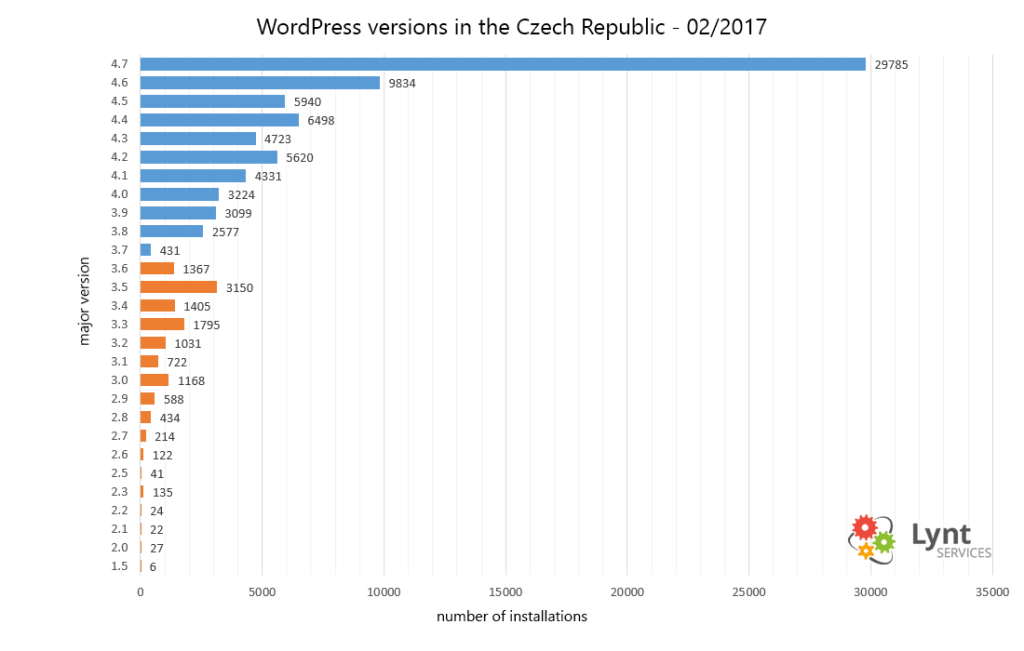
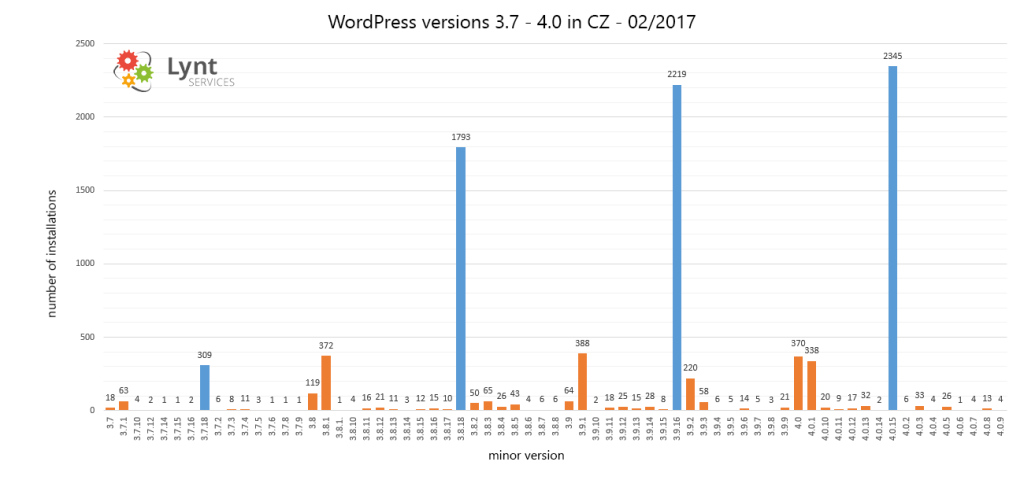
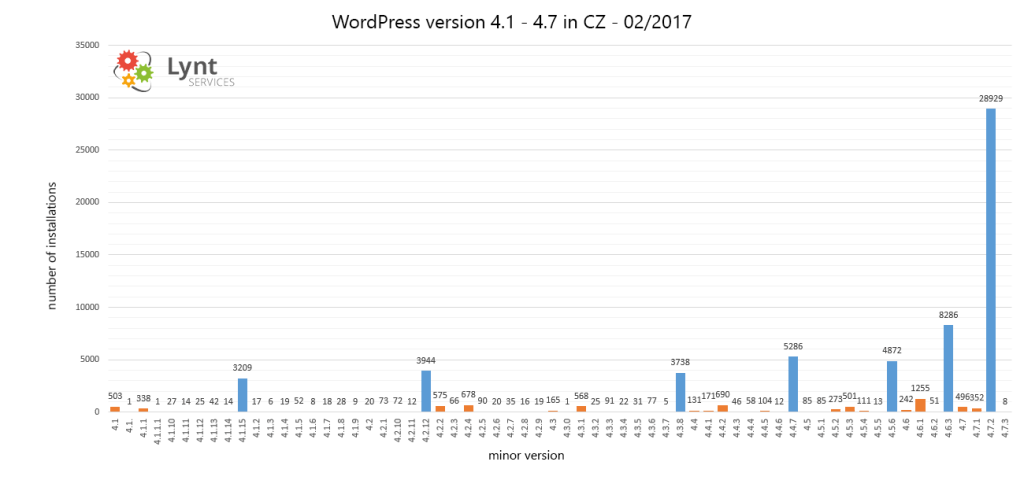
I scanned more than 88 000 czech WordPress sites to determine their version
Results:







 Vladimir Smitka
Leave a comment